Instagram Edits on Windows: Full Desktop App via Remote Mac
Watch on YouTube ↗ · 65 seconds
How can a Windows PC access the full Edits desktop app while it remains Mac-only?
THE SHIFT
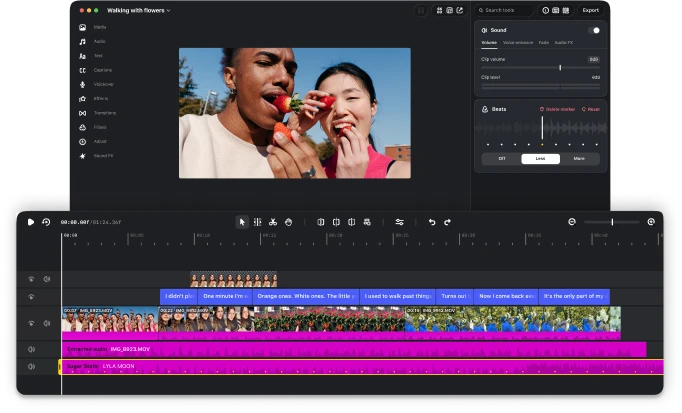
Instagram’s new desktop Edits app is available for macOS on Apple silicon, M1 or newer. It does not provide a Windows installer. To use that desktop app from a Windows PC today, the practical route described here is to control a compatible Mac remotely.
That distinction matters before setup: you need authorized access to the Mac. This method gives your PC access to the actual desktop editor; it does not convert the Mac application into a Windows program.
Official desktop download and requirements.
Source: Instagram Edits desktop — official Mac requirements and download ↗
THE PROOF
Google documents Chrome Remote Desktop as a way to access applications on another computer, with host setup available for Mac, Windows and Linux. We apply that general connection method to a Mac running Edits. The application and its project remain on the Mac; your PC sends input and displays the remote session.
1. Prepare the Mac. Check the current Edits requirements, install the official application, and sign in to Instagram. Use a Mac you own or are authorized to use.
2. Set up its remote host. In Chrome on the Mac, visit remotedesktop.google.com/access. Follow Google’s host installation flow and the macOS permission prompts. Name the host and keep its access PIN private.
3. Connect from Windows. Visit the same site in Chrome on your PC. Sign in to the authorized Google account, select the Mac, and enter its PIN.
4. Open Edits in the session. You now direct the Mac application using your Windows keyboard and mouse.
Google’s current setup and connection instructions.
Source: Instagram Edits desktop — official Mac requirements and download ↗
THE CATCH
A remote window is a view into another machine. A folder on your Windows PC does not automatically become a local folder inside Edits on the Mac. Copy source clips to the host using your chosen authorized cloud/shared folder or transfer service, then import those files in Edits. Keep the project’s referenced media available on the host.
The host must stay online and available. Remote preview can introduce delay or reduce visual fidelity, so review the exported file when checking timing, detail and sound. Export runs on the Mac. Transfer that finished file back to Windows through your selected sharing method.
Parallels Desktop runs Windows on Mac hardware. It is not a Windows-hosted route to the new Edits Mac application. Android emulators provide a separate mobile-app route; they do not establish access to the Mac desktop interface or its automation features.
Parallels Desktop product information.
YOUR MOVE
If you already have access to a suitable Mac, remote control can let you stay at your Windows workstation. If you have no compatible Mac available, this guide does not remove that hardware requirement. Check any hosted Mac’s hardware and app-installation permissions before paying for it; no cloud rental is required by this guide or selected on your behalf.
For AI assistance, install The Breakdown’s free Edits skill in Claude Code or Codex on the Mac host, and configure its supported Edits connection there. A skill supplies instructions; the connected tools determine available editing operations. Remote access alone does not connect a Windows-based agent to Edits.
Start with a small project, confirm you can open its footage, and check where the exported file is saved. Then move to a larger edit.
Windows is your control desk. The Mac runs the editor. Remote access lets you use the full desktop Edits experience from your PC while keeping the compatible Mac requirement clear.
Sources & further reading
- Instagram Edits desktop — official Mac requirements and download ↗
- Google Chrome Remote Desktop — host setup and remote connection guide ↗
- DOWNLOAD THE FREE EDITS SKILL — GitHub and connection guide ↗
- Parallels Desktop — Windows virtualization on Mac ↗
- Related: Edits for Mac and the free AI editing skill ↗
Published by The Breakdown. How we report · Our source desk.