Instagram Edits Is FREE on Mac + AI Editing Skill for Claude Code & Codex
Watch on YouTube ↗ · 62 seconds
How do you turn Instagram Edits on Mac into an AI-assisted video editing workflow?
THE SHIFT
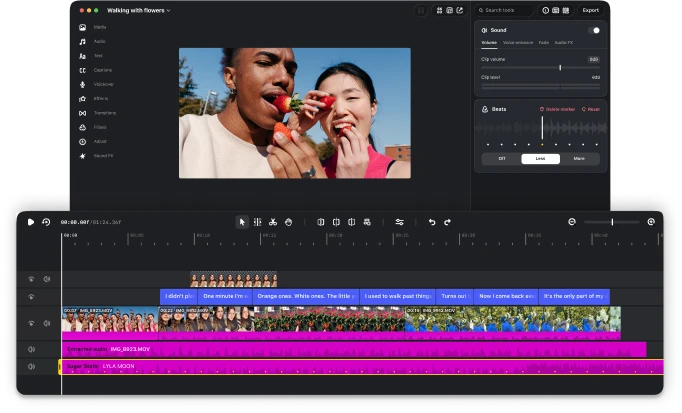
Instagram launched Edits for Mac on November 5, 2026. The free desktop app gives creators more room for complex edits: a multi-track timeline, keyframes, color grading, layered audio, and automatic captions. Instagram’s official desktop page lists watermark-free 4K exports and direct publishing to Instagram.
Desktop access currently requires a Mac with Apple silicon, M1 or later, and an Instagram account. Windows is not listed as supported.
For creators whose projects have outgrown a phone screen, that means a mouse, keyboard, and more precise control over the timeline. TechCrunch’s launch report places the release in direct competition with CapCut’s desktop editor.
Source: Instagram Edits for Mac — official desktop download and features ↗
THE PROOF
The desktop product page shows color wheels and curves, keyframe controls, audio tools, and caption styling. Creators can import LUTs and font files, use Instagram’s audio libraries, and work across multiple aspect ratios. Audio licensing still depends on the track and intended use; library access is not blanket permission for every destination.
To help creators direct an AI-assisted workflow, The Breakdown has released a free, open-source Instagram Edits Desktop Skill for Claude Code and Codex.
Get the skill on GitHub.
The package supplies editing instructions and a method for discovering the controls exposed by your installed Edits version. Its workflows cover cutting and arranging clips, captions and text, transitions and keyframes, color, music and voiceover, and export planning. Actual agent operations depend on the connected tools.
Think of the skill as the playbook. The Edits MCP connection supplies app access. Combining them gives an agent instructions for editing and a way to operate supported controls.
Source: Instagram Edits for Mac — official desktop download and features ↗
CONNECT THE WORKFLOW
Installing the skill does not connect Edits automatically. It also does not guarantee that every feature is available through MCP. The agent must inspect the live tools and their schemas before choosing operations. Some features may require UI access.
The skill is a free, unofficial community package designed to help you work more confidently with AI assistance. Bring the creative direction; give your agent a concrete brief, then refine the pacing, captions, sound, and finishing touches together.
TechCrunch reports that seamless editing of the same project across desktop and mobile is still being developed. Syncing saved audio or text styles should not be confused with full cross-device project editing.
YOUR MOVE
1. Download Edits from its official Mac page and sign in. 2. Open the skill repository, download its release ZIP, and extract it. 3. Open Terminal in the extracted folder. With Python 3.9 or newer, run python3 install.py --client both. Use --client claude or --client codex for one client. 4. In Edits, find Settings → Automation. Enable the server when you want agent control, then use the app-generated setup for your AI client. Keep the connection token private. 5. Refresh the client and ask it to inspect available Edits tools and your current project.
Start with a concrete brief:
Make these clips into a 30-second Reel, add captions, lower the background music, and export.
This is an example request. The connected tool inventory determines which steps the agent can perform. Ask it to preserve originals, check caption spelling, and show the result before publishing.
Your full video editor on your computer. Edits brings the creative tools; the free skill gives your AI a structured way to work with them. Your footage, your vision, a powerful new editing workflow.
Sources & further reading
- Instagram Edits for Mac — official desktop download and features ↗
- DOWNLOAD THE FREE EDITS SKILL — GitHub, release ZIP and setup guide ↗
- TechCrunch — Instagram brings Edits to desktop to take on CapCut ↗
- Further reading: AI products and workflows ↗
Published by The Breakdown. How we report · Our source desk.