Google Antigravity Voice Mode: Talk to Your AI Coding Agent
Watch on YouTube ↗ · 54 seconds
Does talking to a coding agent make it easier to supervise?
THE SHIFT
Google introduced voice mode in Antigravity on November 6, powered by Gemini Live. It is available in the Antigravity App and in CLI version 1.5.0 and later. Instead of submitting a spoken message and waiting for another turn, users can hold a two-way conversation around the task already in progress. The existing conversation supplies its context.
That distinction matters when a task takes longer than a quick answer. You can add a missing detail, ask what the agent is doing or change direction while it works. Voice becomes a way to steer the same workflow, rather than a separate assistant with a separate view of the project.
Source: Voice mode in Antigravity — Google, November 6, 2026 ↗
THE PROOF
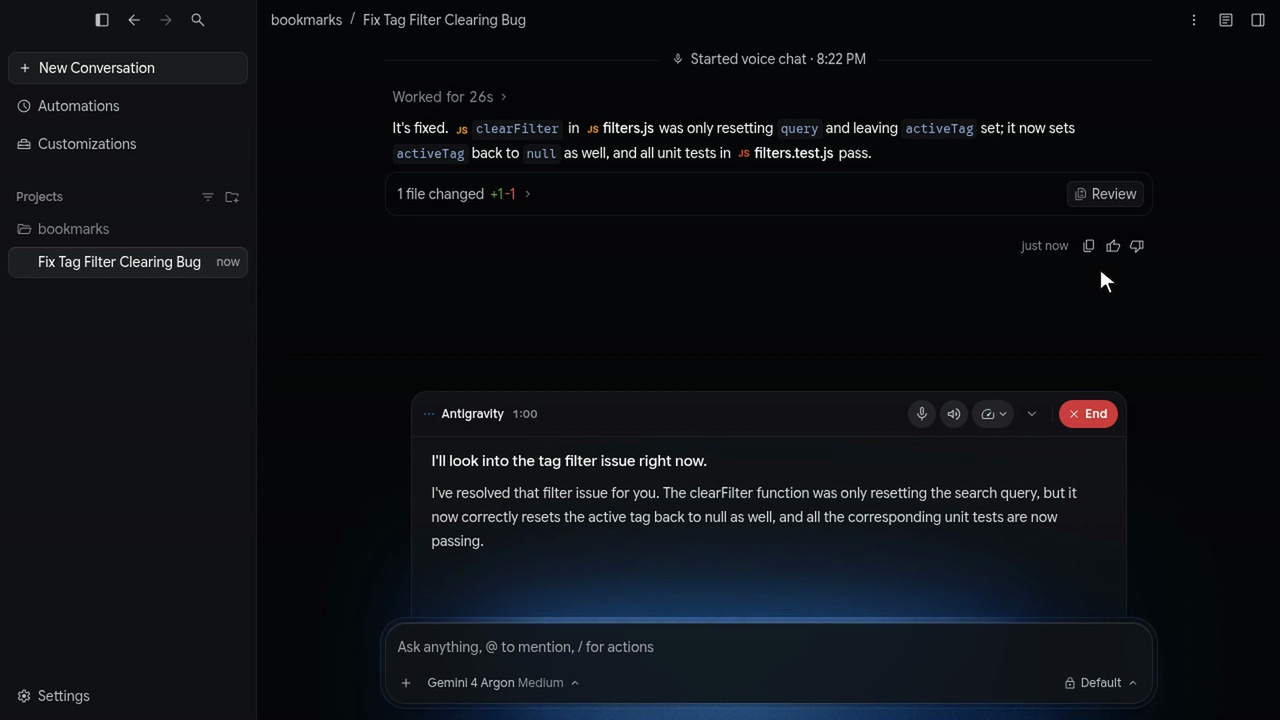
Google’s official App demonstration shows a tag-filter bug being addressed. The conversation displays the reported fix, a one-line change and a statement that the relevant unit tests pass. The voice panel explains the result alongside that visible work. This is a company-selected example, not a measurement of success across different codebases.
Google says the agent can read code, edit files and run commands through the conversation’s existing tools. Gemini Live handles the spoken exchange, including interruptions. The important mechanism is a short loop: instruction leads to action, visible results give the user something to inspect, and the next spoken instruction can correct the course. The terminal demonstration shows the same conversational approach in the CLI.
Source: Voice mode in Antigravity — Google, November 6, 2026 ↗
THE CATCH
Spoken interaction does not remove the permission boundary. Some approval requests can be answered by voice, but Google says destructive actions such as deleting files, running elevated commands or force-pushing to a Git remote cannot be approved that way. Those actions still require an on-screen click; they can be denied by voice.
Ending the call also has a different meaning from stopping the task. Google says unfinished work can continue after a user hangs up. If the intention is to stop execution, the user needs to stop the task rather than assume silence means it ended. A fluent explanation is useful, but the code changes and results still deserve attention.
YOUR MOVE
In the App, open a conversation, leave the message box empty and choose Start Voice mode. The first use includes choosing a voice and granting microphone access. In a supported CLI, use /voice live or F6 to start. Check the current documentation for controls and version requirements.
Try a bounded task where the result is easy to inspect, and keep the visible conversation open. Use speech to add context or ask for a status update, then review what changed. Google says the agent works quietly by default and speaks when it has an answer or needs input, so it does not need to narrate every step.
The shift is not that a coding agent can speak. It is that people can correct its direction without leaving the work behind. Easier conversation is useful when it makes supervision easier too.
Sources & further reading
- Voice mode in Antigravity — Google, November 6, 2026 ↗
- Managed agents and the work that keeps running ↗
- AI that builds, looks and revises ↗
Published by The Breakdown. How we report · Our source desk.